🔑 Key Takeaways
- Prompt engineering for professionals means giving clear and structured instructions to get better AI results.
- Most weak outputs come from vague prompts, not the AI tool itself. Clear input leads to better output.
- Using a simple structure like the P.R.O.M.P.T framework helps you write more effective prompts every time.
- Adding context, role, and output format makes responses more relevant and easier to use.
- Real prompt engineering examples show that small changes in prompts can improve quality significantly.
- AI prompt templates help save time and give consistent results across different tasks.
- Prompts may work differently across tools like ChatGPT, Claude, and Gemini, so adjusting your approach is important.
If you use AI tools often, you’ve likely faced this.
You ask a clear question. The answer looks okay at first. But when you read it, something feels off. It sounds too general. It misses key details. Sometimes it does not match what you wanted.
In most cases, the issue is not the tool. It is the prompt.
The way you ask shapes the result.
That is where prompt engineering for professionals becomes useful. It is not about writing long prompts. It is about writing clear and focused prompts that guide the AI in the right way.
Many people treat AI like a search bar. Professionals treat it like a tool they can direct.
In this guide, you will learn:
Why prompts fail
How to improve them
Real prompt engineering examples
Practical AI prompt templates you can use at work
These methods work across tools like ChatGPT, Claude, and Gemini.
By the end, you will know how to get better results from AI without wasting time.
What Is Prompt Engineering?
Prompt engineering is the process of writing clear and structured instructions for an AI tool so it can generate the output you need.
It works in a simple way. The AI responds based on what you tell it. If your input lacks clarity, the output will also lack clarity.
You can think of it like giving directions to a person. If you give vague instructions, they will guess what you mean. If you explain clearly, they will follow your intent much better.
A prompt can take different forms. It can be a question, a task, or a set of instructions. What matters is how well it communicates your goal.
If you’re wondering whether to learn this skill or take structured training, you can explore prompt engineering vs AI courses to understand which path makes more sense. It is used for writing, research, planning, and decision-making.
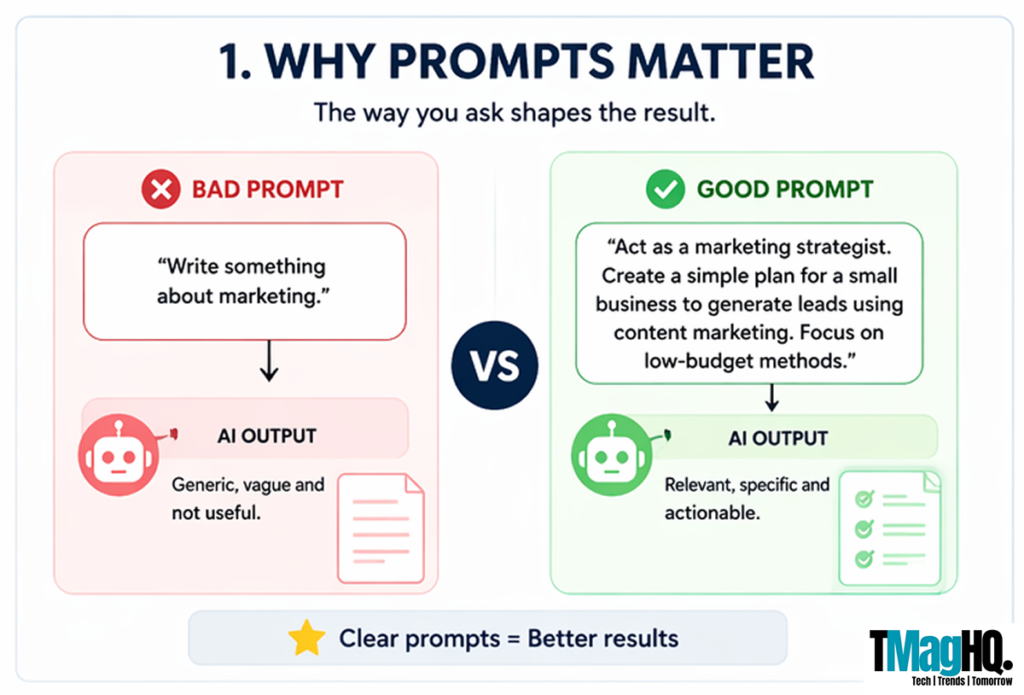
Instead of asking:
“Write something about marketing.”
A more effective approach would be:
“Act as a marketing strategist. Create a simple plan for a small business to generate leads using content marketing. Focus on low-budget methods.”
This version adds direction, context, and a clear outcome.
That is the core idea behind prompt engineering for professionals. You are not just asking the AI to respond. You are guiding it to produce work that fits your needs.
Why Most AI Prompts Fail?
Many people think that AI is the problem when the output feels weak. In most cases, the issue starts with the prompt.
AI tools respond based on what you tell them. If your instructions are unclear or incomplete, the output will reflect that. Once you understand the common mistakes, it becomes much easier to fix them and get better results.
1. Lack of Clarity
One of the most common issues is writing prompts that are too vague.
When you ask something broad, the AI has to guess what you want. This often leads to general answers that do not solve your actual problem. The output may look fine at first, but it lacks depth and direction.
For example, a prompt like “Write about digital marketing” does not explain the goal, audience, or level of detail. Because of this, the response stays basic.
When you make your intent clear and specific, the AI can respond in a much more useful way.
2. Missing Context
AI performs better when it understands the situation behind your request.
If you leave out important details, the response becomes generic. It may sound correct, but it will not match your needs or goals. This is why many outputs feel disconnected from real work.
For instance, asking “Create a content plan” gives a broad answer. But adding context, such as your industry, audience, and objective,s helps the AI generate something more relevant and actionable.
Clear context leads to better alignment between your input and the output.
3. No Defined Output Format
Another common mistake is not telling the AI how to present the answer.
When you skip this step, the AI chooses its own structure. Sometimes that works, but often it does not match what you expect. You may want a list or steps, but the AI gives long paragraphs instead.
This creates extra work because you have to rephrase your prompt or ask again.
When you define the format in advance, you save time and get results that are easier to use.
4. No Role Assigned
AI responds differently based on the role you assign.
If you do not define a role, the output often lacks focus and depth. The AI gives a general answer instead of one tailored to your needs.
For example, “Explain SEO” will produce a basic explanation. But asking the AI to act as an SEO expert and explain it for beginners leads to a more structured and practical response.
Assigning a role helps the AI understand how it should approach the task.
5. Expecting Perfect Output in One Try
Many users expect the first response to be perfect.
In practice, strong results often come from refining your prompt. You review the output, adjust your instructions, and improve the response step by step.
This approach helps you guide the AI toward better answers instead of settling for the first version.
Iteration is a key part of prompt engineering for professionals, especially when the task involves complex or detailed work.
6. Ignoring Tool Differences
Different AI tools do not behave in the same way.
A prompt that works well in ChatGPT may need small changes in Claude or Gemini. Each tool has its own strengths and limitations.
Some tools handle long-form content better, while others are stronger in research or structured outputs.
If you want to understand how these tools differ, you can explore our AI tools and guides to see how they perform across use cases.
The P.R.O.M.P.T Framework
If you want consistent results from AI, you need a clear way to write prompts.
The P.R.O.M.P.T framework gives you a simple structure that helps you avoid guesswork. Instead of writing random instructions, you follow a system that improves clarity and output quality.
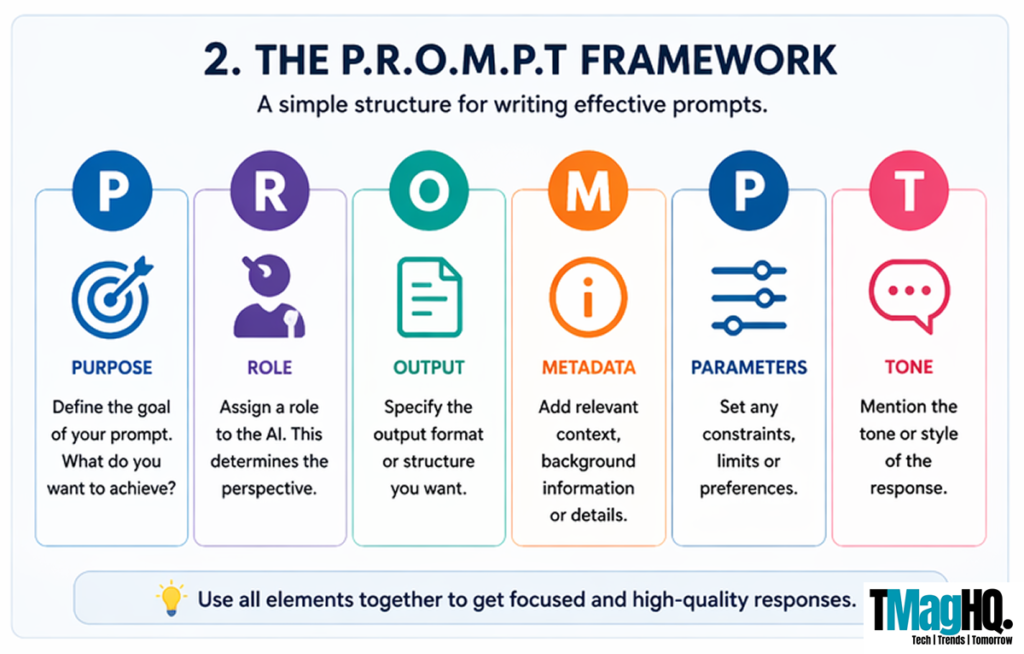
Each part of the framework adds a specific layer of direction, which helps the AI respond in a more useful and predictable way.
P – Purpose
Start with a clear goal.
You need to tell the AI exactly what you want it to do. When the purpose is vague, the output becomes vague as well. A clear purpose helps the AI stay focused on the task and reduces the chances of getting a generic response.
For example, “Write a blog post” does not give enough direction. But “Write a beginner-friendly blog on how to improve website SEO” sets a clear expectation and leads to a more useful result.
R – Role
Assign a role to the AI before giving instructions.
When you define a role, the AI adjusts its response based on that perspective. This improves the depth and relevance of the output, especially for professional tasks where tone and expertise matter.
You can ask the AI to act as an SEO expert, a marketing strategist, or a business consultant. Without a role, the response often stays general. With a role, it becomes more focused and aligned with your intent.
O – Output Format
Tell the AI how you want the answer to be presented.
If you do not define the format, the AI will choose one on its own. This often leads to outputs that do not match your expectations and require extra edits.
When you clearly mention the format, such as steps, short paragraphs, or a structured explanation, the response becomes easier to read and apply. This simple step can save time and improve usability.
M – Metadata (Context)
Provide the background details that help the AI understand your request.
Context allows the AI to tailor its response to your situation. Without it, the output remains broad and less useful. With the right context, the response becomes more relevant and practical.
You can include details like your target audience, industry, platform, or skill level. These inputs guide the AI to produce content that fits your needs instead of giving a one-size-fits-all answer.
P – Parameters
Set clear limits for the output.
Parameters help control how the response is written and ensure it stays within your expectations. Without boundaries, the AI may produce content that is too long, too detailed, or not aligned with your goal.
You can define aspects like length, level of detail, and writing style. For example, asking for a concise response in simple language helps keep the output focused and easy to use.
T – Tone
Define how the content should sound.
Tone affects how the message is delivered and how it connects with the reader. A clear tone makes the output feel more natural and aligned with your purpose.
You can choose a tone based on your use case, such as professional, conversational, or friendly. When tone is defined, the response becomes more consistent and easier to use across different tasks.
Putting It All Together
When you combine all parts of the framework, your prompt becomes structured and effective.
For example:
“Act as an SEO expert. Write a beginner-friendly blog for small business owners on how to rank a website in 2026. Use simple language, include clear steps, and keep the tone practical.”
This prompt works well because it includes a clear goal, a defined role, relevant context, and output guidance.
This is how prompt engineering for professionals works in practice. You are not just asking a question. You are guiding the AI to produce results that match your needs.
Prompt Engineering Examples
Understanding concepts is helpful, but real improvement comes from seeing how prompts work in practice.
In this section, we will look at prompt engineering examples that show how small changes in input can lead to better output. These examples focus on real tasks that professionals deal with every day.
A] Using ChatGPT for Content Writing
Let’s start with a common task like writing a blog post.
A basic prompt such as “Write a blog on SEO tips” often leads to a generic response. It may include common points, but it lacks depth and direction.
Now compare it with a structured prompt:
“Act as an SEO expert. Write a blog for beginners on how to improve website rankings in 2026. Use simple language, include clear steps, and add practical examples.”
This version works better because it defines the role, audience, and expected output. The result is more focused and easier to use.
This is a simple example of how prompt engineering for professionals improves content quality without changing the tool.
B] Using Claude for Long-Form Work
When working on detailed tasks like reports or strategy documents, clarity becomes even more important.
A vague prompt like “Write a business strategy” does not give enough direction. The output may feel broad and disconnected from real use.
A better version would be:
“Act as a business consultant. Create a simple growth strategy for a small online business. Focus on content marketing and low-budget methods. Keep the explanation clear and practical.”
With this approach, the response becomes more structured and aligned with real-world use.
C] Using Gemini for Research Tasks
Research-based tasks need accurate and structured responses.
If you ask, “Give me information about AI in marketing,” the output may include mixed points without clear organization.
Instead, you can write:
“Summarize how AI is used in digital marketing. Focus on three main use cases and explain each with a simple example.”
This prompt sets boundaries and makes the output easier to understand.
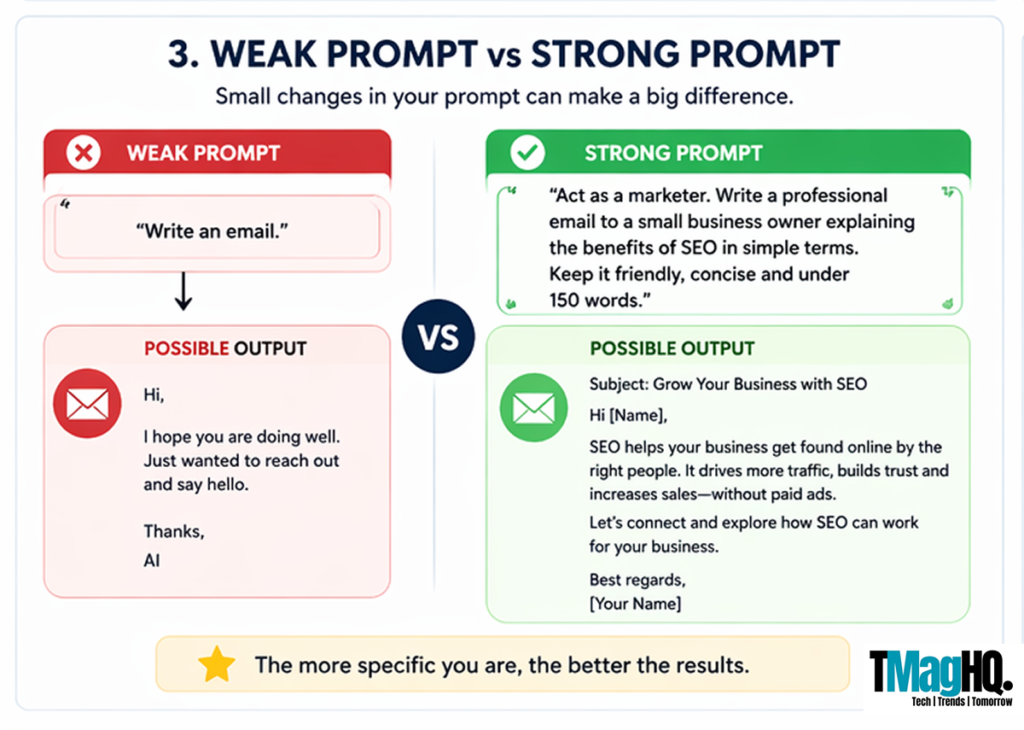
D] Before vs After Prompt Example
To make the difference clearer, let’s compare a weak and a strong prompt side by side.
Weak prompt:
“Write an email for a client.”
Improved prompt:
“Act as a professional marketer. Write a short email to a client explaining the benefits of SEO services. Keep the tone friendly and clear.”
The second version produces a more useful result because it includes purpose, role, and tone.
E] What You Should Notice
Across all these prompt engineering examples, one pattern stays consistent.
Better prompts include:
- Clear instructions
- Defined roles
- Relevant context
- Expected output format
Once you start applying these elements, you will see better results across different tools and tasks.
Advanced Prompt Engineering Techniques
Once you understand the basics, the next step is to refine how you write prompts so you can get more precise and reliable results.
These advanced prompt engineering techniques are useful when you work on complex tasks like strategy, analysis, or detailed content. They help you guide the AI step by step instead of relying on a single instruction.
1. Few-Shot Prompting
Few-shot prompting means giving the AI a few examples before asking it to perform a task.
Instead of only describing what you want, you show the AI how the output should look. This helps it understand the pattern and follow it more accurately.
For example, if you want the AI to write product descriptions, you can provide two short samples first and then ask it to create a new one. The AI will follow the same style and structure.
This technique works well when you need consistency in tone and format across multiple outputs.
2. Chain-of-Thought Prompting
Chain-of-thought prompting helps the AI break down a task into steps.
Instead of asking for a direct answer, you guide the AI to explain its reasoning step by step. This often leads to more accurate and structured responses, especially for complex topics.
For example, instead of asking for a final answer, you can ask the AI to explain the process first and then provide the result.
This method is useful for planning, problem-solving, and detailed explanations.
3. Constraint-Based Prompting
Constraint-based prompting means setting clear limits on the output.
You guide the AI by defining what it should and should not include. This helps reduce unnecessary information and keeps the response focused.
For example, you can limit the length, restrict the tone, or ask the AI to focus only on specific points. These constraints make the output more relevant and easier to use.
This technique is helpful when you want concise and controlled responses.
4. Iterative Prompting
Iterative prompting is the process of improving your prompt step by step.
Instead of expecting the perfect answer in one attempt, you refine the prompt based on the previous output. You adjust instructions, add context, or clarify the format to improve the result.
This approach works well for tasks that require precision, such as content creation or strategy planning.
Over time, this becomes a natural part of prompt engineering for professionals, where you guide the AI toward better outputs through small improvements.
5. Combining Techniques
In real use, you do not need to rely on just one method.
You can combine these techniques to get better results. For example, you can use few-shot prompting along with constraints or combine step-by-step reasoning with clear formatting instructions.
When you apply these techniques together, the output becomes more structured, accurate, and aligned with your needs.
AI Prompt Templates for Professionals
Once you understand how prompts work, the next step is to use ready structures that save time.
These AI prompt templates help you avoid starting from scratch. You can reuse them across tasks and adjust the details based on your needs. Each template follows the same idea: clear goal, defined role, relevant context, and expected output.
I. Marketing Prompt Template
Use this when you need ideas, campaigns, or content plans.
“Act as a marketing strategist. Create a simple marketing plan for [business type]. Focus on [goal such as lead generation or brand awareness]. Target [audience]. Keep the approach practical and easy to execute.”
This template helps you get structured ideas instead of random suggestions.
II. SEO Prompt Template
Use this for blog writing, keyword ideas, or optimization.
“Act as an SEO expert. Create a blog outline on [topic]. Target [audience level]. Include clear headings, key points, and simple explanations. Keep the structure easy to follow.”
You can expand this template further by asking for meta titles, descriptions, or keyword suggestions.
III. Business Strategy Prompt Template
Use this for planning and decision-making.
“Act as a business consultant. Suggest a growth strategy for [type of business]. Focus on [specific area such as content, sales, or operations]. Keep the recommendations practical and suitable for a small team.”
This template helps you get actionable insights instead of broad advice.
IV. Email Writing Prompt Template
Use this for professional communication.
“Act as a professional communicator. Write a short email to [recipient type] about [purpose]. Keep the tone clear and polite. Make the message easy to understand.”
You can adjust tone and length based on the situation.
V. Productivity and Workflow Template
Use this to organize tasks or improve efficiency.
“Act as a productivity expert. Create a simple workflow for [task or goal]. Break it into clear steps. Keep the process practical and easy to follow.”
This works well for planning daily work or managing projects.
VI. How to Use These Templates
These templates are starting points, not fixed rules.
You can adjust the goal, role, context, and output based on your task. The more specific you make each part, the better the result will be.
These templates also work across different tools. Whether you are using ChatGPT, Claude, or Gemini, the structure remains effective.
Using AI prompt templates helps you work faster and get consistent results. In the next section, we will look at how prompt engineering changes based on your role and type of work.
Prompt Engineering by Role
The way you write prompts should match the kind of work you do. A general prompt may give a decent answer, but it often misses the details that matter in real tasks.
This is where prompt engineering for professionals becomes useful. When you shape your prompts based on your role, the output becomes more relevant and easier to use.
A] For Marketers
Marketers often use AI for content ideas, campaigns, and messaging.
A common issue is asking for broad suggestions, which leads to generic outputs. When the prompt does not define the audience or goal, the response lacks direction.
A better approach is to include details like target audience, platform, and campaign objective. This helps the AI generate ideas that are more focused and practical.
Clear prompts lead to stronger messaging and better content planning.
B] For Founders and Entrepreneurs
Founders use AI for planning, decision-making, and problem-solving.
When prompts are vague, the advice tends to be general and hard to apply. To improve this, it helps to include details like business type, stage, and current goals.
For example, asking for a growth plan works better when you explain your business model and what you are trying to achieve. This allows the AI to give more relevant suggestions.
Better prompts support clearer thinking and faster decisions.
C] For Developers
Developers use AI for coding, debugging, and explanations.
If the prompt is not specific, the output may not match the expected logic or structure. This often leads to more back and forth.
To improve results, it is important to describe the problem clearly and mention the desired outcome. Including details like programming language and use case also helps.
Clear technical prompts lead to more accurate and usable responses.
D] For Content Creators
Content creators rely on AI for writing, scripting, and idea generation.
Generic prompts often produce content that feels repetitive or lacks depth. To avoid this, prompts should define tone, audience, and format.
For example, asking for a blog outline becomes more useful when you mention who the content is for and how it should sound. This helps the AI create content that feels more natural.
Better prompts help maintain quality and consistency.
E] Adapting Prompts to Your Work
Each role has different needs, but the core idea remains the same.
You need to be clear about your goal, provide the right context, and guide the output. When you adjust your prompts to match your work, the results become more useful and easier to apply.
Common Prompt Engineering Mistakes
Even when you understand the basics, small mistakes can reduce the quality of your results.
These issues are common, but once you fix them, your outputs improve quickly. This is an important part of prompt engineering for professionals, where small changes in input can lead to better results.
1. Being Too Vague
One of the most common mistakes is writing prompts that are not clear.
When your request is broad, the AI has to guess what you mean. This often leads to general answers that do not solve your actual problem.
For example, asking for “marketing ideas” gives a wide response. When you define the goal, audience, and context, the output becomes more focused and useful.
2. Overloading the Prompt
Adding too many instructions in one prompt can create confusion.
When you include multiple goals or mixed directions, the AI may not respond clearly. The output can feel scattered and harder to use.
It is better to focus on one main task at a time. If needed, you can break the work into smaller steps and refine it gradually.
3. Ignoring Structure
Many users write prompts without any clear structure.
When instructions are not organized, the AI may not understand what matters most. This often leads to outputs that lack clarity or direction.
Using a simple structure helps the AI follow your instructions better and produce more useful responses.
4. Not Refining the Output
Many people expect the first response to be perfect.
In reality, good results often come from improving the prompt step by step. You review the output, adjust your instructions, and guide the AI toward a better answer.
This process helps you move from a basic response to something more refined and practical.
5. Ignoring Tool Behavior
Different AI tools respond in different ways.
A prompt that works well in ChatGPT may need small changes in Claude or Gemini.
Understanding these differences helps you adjust your prompts and get more consistent results.
6. Writing Without a Clear Goal
Sometimes the prompt itself lacks a defined outcome.
When you are not clear about what you want, the AI cannot give a focused answer. This leads to responses that feel incomplete or off track.
Before writing a prompt, it helps to define your goal. Once the goal is clear, the instructions become easier to write.
Do Prompts Work the Same Across AI Tools?
Many people expect the same prompt to give the same result on every AI tool. In real use, that does not happen.
Each tool responds in its own way. The structure, detail, and tone of the output can change even when the prompt stays the same. Because of this, you need to adjust your approach based on the tool you use.
A] Differences in Output Style
AI tools differ in how they present answers.
Some tools give detailed and well-structured responses, while others keep things short and direct. This affects how useful the output feels for your task.
For example, ChatGPT often gives balanced and structured responses. Claude handles longer and more detailed content well. Gemini is often helpful when the task involves recent information or connected tools.
B] Differences in Handling Context
Not all tools handle context in the same way.
When you provide detailed instructions, some tools follow them closely, while others may simplify or skip parts of the request. This can change the accuracy and depth of the output.
Because of this, it helps to adjust your prompt if the response does not match your expectation.
C] Differences in Following Instructions
Even with clear prompts, the level of control can vary.
Some tools follow the format you define very closely, while others may respond more flexibly. This can affect how well the output matches your required structure.
If the result feels off, you may need to make your instructions more direct and specific.
D] Adapting Your Prompts
Instead of expecting the same result everywhere, it is better to adjust your prompts based on the tool.
Small changes often improve the output. You can add more detail, simplify your instructions, or define the format more clearly.
Over time, you learn how each tool responds and how to guide it better.
E] Why This Matters
Understanding these differences helps you work more efficiently.
When you adjust your prompts based on the tool, you get better results with less effort. This is a key part of prompt engineering for professionals, where you focus on getting consistent and useful output.
If you want to explore how different tools perform, you can check out our AI tools and guides for more details.
Best Practices to Get Consistent Results
Once you understand how prompts work, the next step is to build habits that help you get reliable results every time.
These practices are simple, but they make a big difference in how useful your outputs are. This is where prompt engineering for professionals becomes part of your daily workflow.
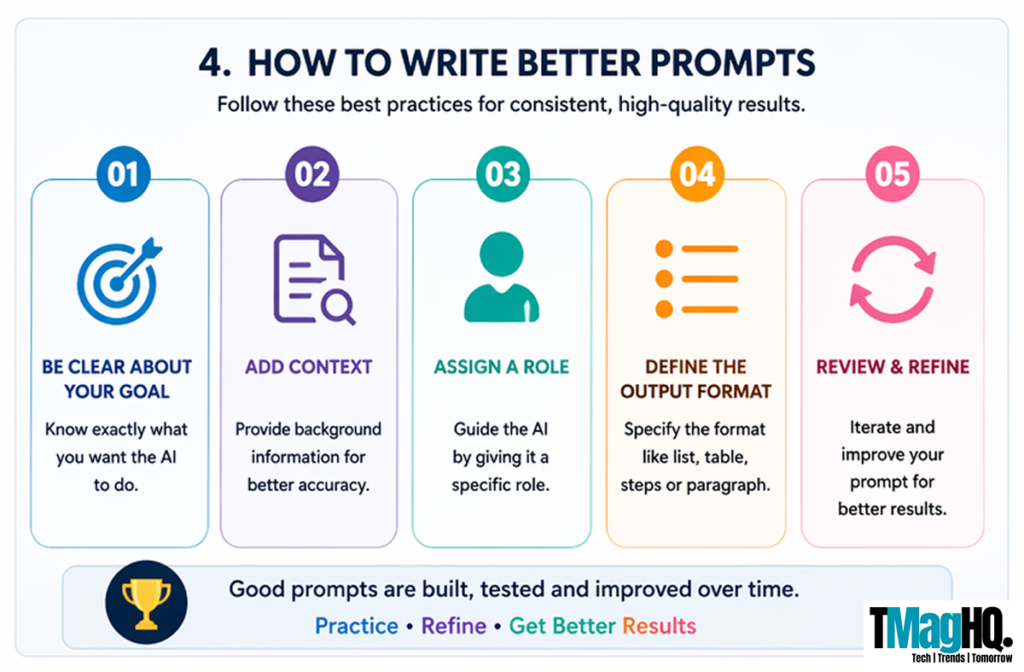
1. Start with a Clear Goal
Before you write a prompt, take a moment to define what you need.
When your goal is clear, your instructions become easier to write. This helps the AI focus on the right task and avoids unnecessary output.
If the goal is not clear, the response will also feel unfocused. A simple shift in clarity can improve the result right away.
2. Add Relevant Context
Context helps the AI understand your situation.
When you include details like audience, purpose, or platform, the response becomes more aligned with your needs. Without context, the output often stays general.
You do not need to add too much. Just include what is necessary to guide the response in the right direction.
3. Define the Output Format
Tell the AI how you want the answer.
When you define the format, you reduce confusion and avoid extra edits. This makes the output easier to use from the start.
You can ask for steps, short explanations, or structured responses depending on your task.
4. Keep Prompts Focused
Try to keep each prompt centered on one main task.
When you mix too many instructions, the output can lose clarity. A focused prompt helps the AI stay on track and produce better results.
If the task is complex, break it into smaller parts and handle them one by one.
5. Refine as You Go
Do not expect the first response to be perfect.
Review the output and adjust your prompt if needed. Small changes in wording or structure can improve the result.
This process helps you guide the AI toward a more useful answer over time.
6. Learn from Each Output
Every response gives you insight into how the AI works.
When something works well, try to understand why. When it does not, look at what can be improved in your prompt.
This habit helps you build better prompts faster and improves consistency across tasks.
Final Thoughts
AI tools are powerful, but the results you get depend on how you use them.
When you improve your prompts, you improve your output. This is the core idea behind prompt engineering for professionals. It is not about writing complex instructions. It is about being clear, structured, and intentional.
Once you start applying these methods, you will notice a clear difference in the quality of your results. Tasks become easier, outputs become more useful, and you spend less time fixing responses.
If you want to go further, you can explore more artificial intelligence resources and tools to see how different platforms perform in real use cases.
The more you practice, the better your prompts become.
What is prompt engineering?
Prompt engineering is the process of writing clear instructions for an AI tool so it can produce useful results.
Instead of asking vague questions, you guide the AI with a defined goal, context, and structure. This helps improve the quality of the output and makes it more relevant to your needs.
How do you write better prompts for AI?
To write better prompts, focus on clarity and structure.
Start with a clear goal, add relevant context, assign a role if needed, and define how you want the output. Small improvements in how you ask can lead to much better results.
This approach is the foundation of prompt engineering for professionals.
What are some good prompt engineering examples?
Good prompt engineering examples include prompts that clearly define the task, audience, and expected output.
For instance, instead of asking “Write a blog,” a better version would be “Act as an SEO expert and write a beginner-friendly blog on improving website rankings with clear steps.”
This type of prompt leads to more focused and useful content.
Do prompts work the same across all AI tools?
No, prompts do not always work the same across tools.
Each tool responds in its own way, so you may need to adjust your prompt slightly depending on the platform. What works well in ChatGPT may need small changes in Claude or Gemini.
Understanding these differences helps you get better results.
Are AI prompt templates useful?
Yes, AI prompt templates are useful because they save time and improve consistency.
Instead of writing a new prompt every time, you can use a structured format and adjust it based on your task. This helps you get reliable results across different use cases.
Is prompt engineering still relevant in 2026?
Yes, prompt engineering remains relevant.
Even as AI tools improve, the quality of the output still depends on the input. Clear instructions help you get more accurate and useful results.
For professionals, this skill continues to play an important role in using AI effectively.